

Introduction
You built a great WordPress site. Now what?
Getting visitors is the real challenge. Without the right SEO plugin, your site can remain invisible on Google. You could have the best content in your niche and still get zero traffic if your technical SEO is broken or your pages aren’t properly optimized.
After years of testing SEO tools, I’ve seen which plugins actually work and which ones waste time and money. This guide breaks down the best WordPress SEO plugins in 2026 — with real, practical advice on which ones to use and exactly why they matter for growing organic traffic.
Why You Absolutely Need a WordPress SEO Plugin
WordPress is powerful, but it’s not fully SEO-ready out of the box. It doesn’t come with built-in tools for editing meta tags, generating XML sitemaps, adding schema markup, or controlling how search engines crawl your pages.
SEO plugins fill those gaps. They handle the technical side of optimization so you can focus on creating content, building links, and growing your audience. Without one, you’re leaving rankings — and traffic — on the table.
What Makes a Great SEO Plugin?
Not all SEO plugins are equal. Before picking one, understand what separates a genuinely great tool from a mediocre one:
- Easy setup and usability for all skill levels
- Real-time content optimization feedback
- Technical SEO tools including sitemaps and redirects
- Schema markup support for rich snippets
- Minimal impact on site speed and performance
- AI search optimization features for modern SEO
1. Yoast SEO Premium — Best for Beginners Who Want Guided Optimization
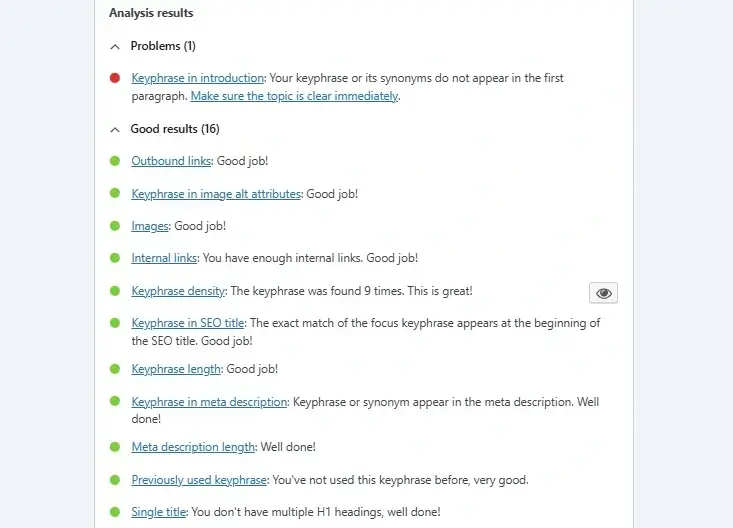
Best for: Beginners and bloggers who want guidance while writing
Yoast SEO is the most widely used SEO plugin in the world. It has been around since 2008 and has earned its reputation by making on-page optimization accessible to everyone. Its interface is intuitive, its feedback is immediate, and it covers the essential SEO elements every page needs.
Yoast provides real-time SEO and readability feedback as you write your content inside the WordPress editor. A traffic light system tells you what’s working and what needs attention. Green means good, orange means room for improvement, red means you have a problem to fix.
Key Features of Yoast SEO Premium
- Live SEO and readability analysis while you write content
- Multi-keyword optimization to target several focus keywords per post
- Internal linking suggestions to strengthen your site architecture
- AI-generated meta tags and title suggestions using Yoast’s AI features
- Automatic XML sitemap generation for all page types
- Social media preview settings for Facebook and Twitter sharing
- Redirect manager to handle broken URLs without losing link equity
- Orphaned content filter to identify posts that need internal links
What Yoast SEO Does Especially Well
Yoast excels at teaching SEO as you go. Every suggestion it makes comes with an explanation. If your meta description is too short, Yoast tells you why that matters. If your keyword density is low, it explains how to fix it. For someone new to SEO, this real-time coaching is incredibly valuable.
The readability analysis is also genuinely useful. Yoast checks sentence length, paragraph structure, passive voice usage, and transition words. These factors affect how long visitors stay on your page — which indirectly influences rankings.
Verdict
Yoast SEO Premium is the best choice for beginners and content-focused websites. If you’re building a blog, running a personal brand site, or just getting started with SEO, Yoast gives you the guidance you need without overwhelming complexity. The premium version is worth it for serious sites due to the redirect manager and AI features.
2. Rank Math — Best for New Sites That Want Powerful Free Features
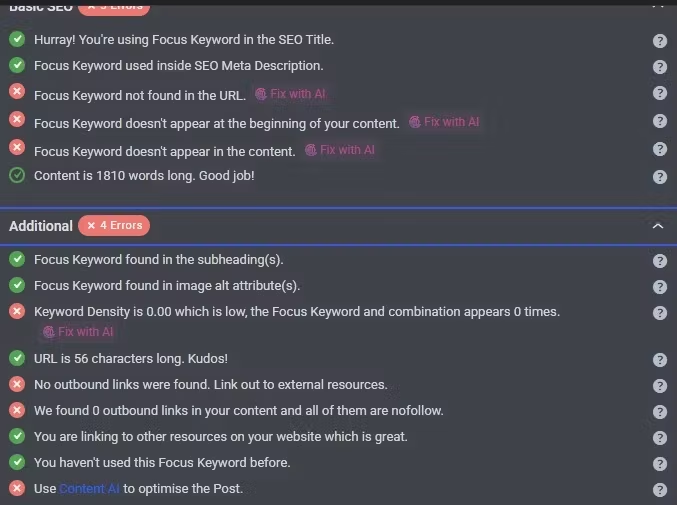
Best for: New sites, growing websites, and users who want advanced features for free
Rank Math launched in 2018 and quickly became one of the most popular SEO plugins available. It offers an exceptional amount of functionality in its free version — functionality that competing plugins often charge for. The interface is modern, the setup wizard is thorough, and the Google Search Console integration puts data directly inside your WordPress dashboard.
Key Features of Rank Math
- Unlimited keyword optimization — optimize for as many focus keywords as you need
- 40+ schema types built in, including Article, Product, FAQ, HowTo, and Recipe
- 404 error monitor and redirect manager included for free
- Google Search Console integration showing impressions, clicks, and rankings per post
- Advanced SEO analysis tool that audits your entire site
- Role manager to control which team members can change SEO settings
- Rank Math SEO score visible on every post in the editor
- Local SEO schema for businesses with physical locations
- Image SEO tool that automatically adds alt text to images
- Content AI for keyword suggestions and topic recommendations
What Rank Math Does Especially Well
Rank Math delivers extraordinary value in its free version. Most plugins reserve schema markup, advanced redirects, and keyword tracking for paid tiers. Rank Math includes all of this at no cost. For a new website trying to compete without a large budget, this is a significant advantage.
The Google Search Console integration is also a standout feature. Seeing your actual rankings, impressions, and click-through rates while editing a post helps you make smarter content decisions. You can see exactly which keywords are driving traffic and where your positions are dropping — all without leaving WordPress.
Verdict
Rank Math is the best all-in-one SEO plugin for most websites. Its combination of powerful free features, clean interface, and deep integrations makes it the top recommendation for new sites and growing businesses. If you’re starting fresh or migrating from another plugin, Rank Math should be your first choice.
3. All in One SEO (AIOSEO) — Best for Growing Sites and AI-Ready SEO
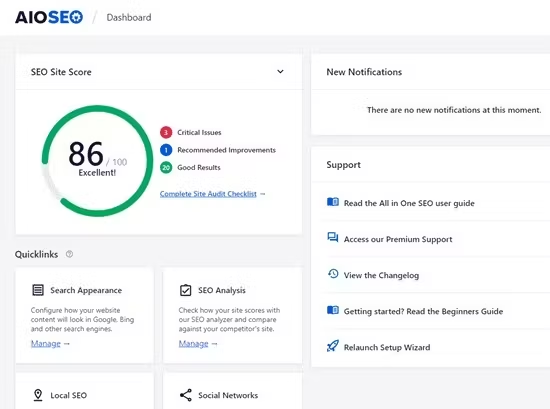
Best for: Growing websites, eCommerce stores, and businesses preparing for AI search
All in One SEO is one of the original WordPress SEO plugins, having launched in 2007. It has gone through significant updates in recent years and now offers some of the most advanced features available — particularly around AI search optimization and eCommerce SEO. Its TruSEO scoring system gives page-level analysis that goes beyond surface-level recommendations.
Key Features of AIOSEO
- TruSEO scoring system that analyzes both on-page and technical SEO factors per post
- AI meta tag generation that creates optimized titles and descriptions automatically
- Internal linking assistant that suggests relevant internal links while you write
- LLM.txt support — a file that tells AI language models how to interact with your content
- Author SEO features to help establish E-E-A-T across your content
- WooCommerce SEO integration with product-specific schema and optimization
- Link assistant that audits all internal and external links across your site
- Smart sitemaps including Video Sitemap, News Sitemap, and RSS feeds
- Local SEO module with opening hours, map embed, and location schema
- Advanced robots.txt editor to control crawler access precisely
What AIOSEO Does Especially Well
AIOSEO’s LLM.txt feature is genuinely forward-thinking. As AI-powered search tools like Perplexity, ChatGPT, and Google’s AI Overviews become more prominent, giving AI systems clear instructions about your content becomes increasingly valuable. AIOSEO is one of the very few plugins addressing this directly.
The Author SEO features are also strong. Google’s E-E-A-T guidelines place significant weight on authorship and expertise. AIOSEO helps you build structured author profiles that signal credibility to search engines.
Verdict
All in One SEO is the best choice for businesses that want future-ready SEO and AI search optimization. Its combination of technical depth, AI features, and eCommerce support makes it ideal for growing sites that need more than basic optimization.
4. The SEO Framework — Best for Developers and Performance-Focused Sites
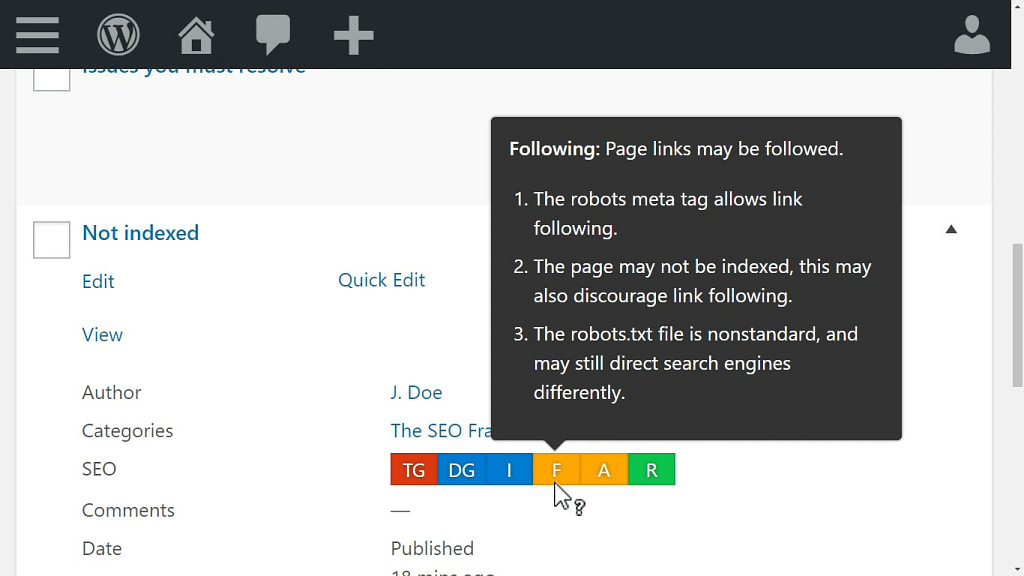
Best for: Developers, advanced users, and sites where speed and clean code matter most
The SEO Framework takes a different approach to SEO plugins. While most competitors pile features into their interfaces, The SEO Framework focuses on automation, performance, and clean implementation. It does the work quietly, without nagging you with constant notifications or trying to upsell you on every screen.
Key Features of The SEO Framework
- Automatic meta tag generation based on your content without manual input required
- Lightweight codebase with minimal impact on page load speed
- No advertisements or upsell prompts anywhere in the plugin interface
- Preconfigured settings that work correctly out of the box for most sites
- Color-coded SEO indicator bars instead of scores or percentage ratings
- Full canonical URL management to prevent duplicate content issues
- Automated Open Graph and Twitter Card tags for social sharing
- Extension manager for adding only the features you actually need
What The SEO Framework Does Especially Well
Speed. The SEO Framework is noticeably lighter than Yoast or Rank Math. For sites where every millisecond of page load time matters — particularly eCommerce stores and high-traffic publishers — this performance advantage is meaningful.
The clean, distraction-free interface is also a major selling point. There are no banner ads, no persistent upgrade prompts, and no cluttered dashboards. Developers and technical users appreciate this minimalist approach.
Verdict
The SEO Framework is perfect for developers and performance-focused sites that want clean, automated SEO without the bloat. If you know what you’re doing and want a plugin that stays out of your way, this is your best option.
5. Google Site Kit — Best for Monitoring Performance Inside WordPress
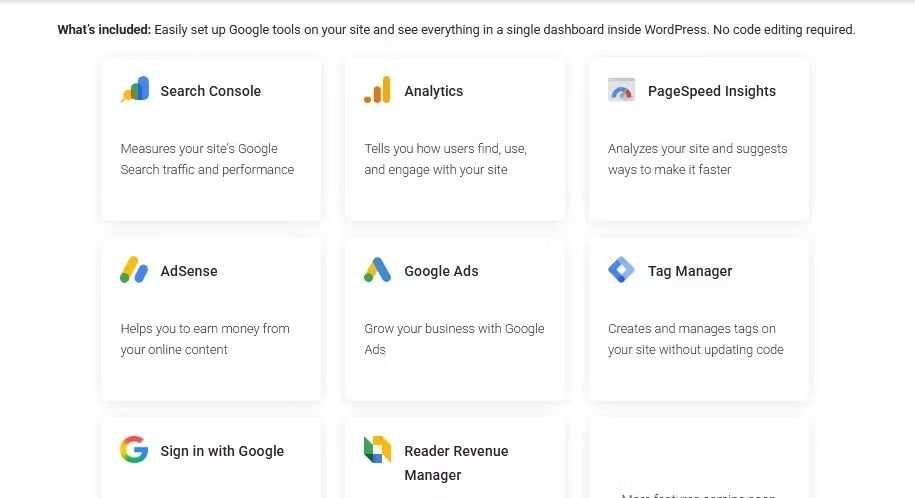
Best for: Site owners who want Google’s data accessible directly from WordPress
Google Site Kit is the official WordPress plugin built by Google. Its primary purpose is connecting your WordPress site to Google’s suite of tools — Search Console, Analytics, PageSpeed Insights, and AdSense — and displaying the data inside your WordPress dashboard.
Site Kit is not a traditional SEO plugin. It does not help you optimize meta tags or add schema markup. What it does is give you direct access to your performance data without switching between tools constantly.
Key Features of Google Site Kit
- Google Search Console integration showing clicks, impressions, and position data per page
- Google Analytics 4 integration for traffic, engagement, and conversion tracking
- Core Web Vitals tracking powered by PageSpeed Insights data
- AdSense integration for sites running display advertising
- Free with no premium tier required for core functionality
- Easy setup process with Google account authentication
Verdict
Google Site Kit is the best tool for monitoring SEO performance directly inside WordPress. Use it alongside a dedicated SEO plugin like Rank Math or Yoast, not as a replacement. The two categories serve different purposes and work well together.
6. Smush — Best for Image Optimization and Page Speed
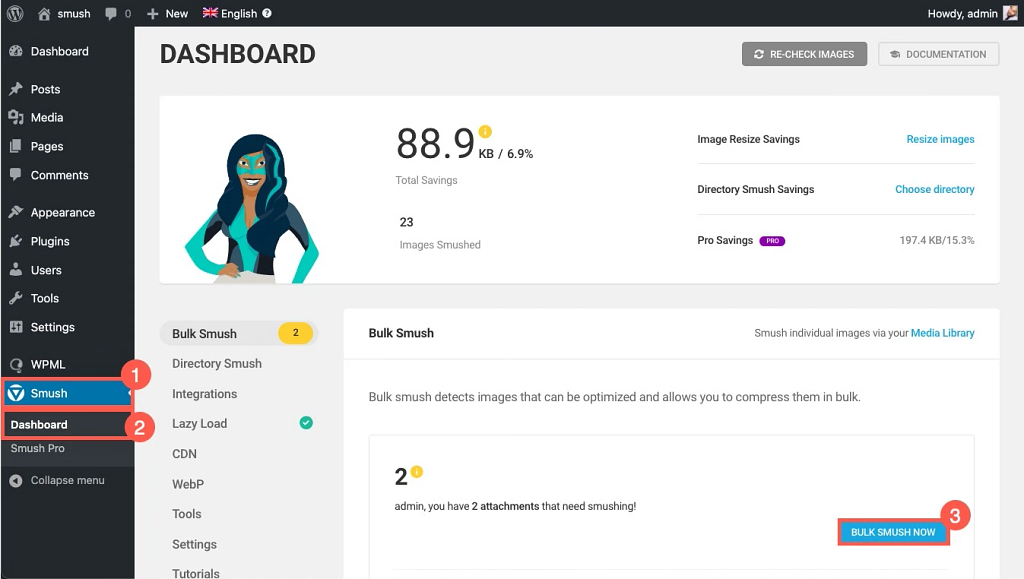
Best for: Sites with lots of images that need faster load times
Images are one of the biggest causes of slow WordPress sites. Smush is the leading image optimization plugin for WordPress, helping you compress, resize, and lazy load images without sacrificing visual quality. Since page speed is a confirmed Google ranking factor, Smush directly contributes to better SEO performance.
Key Features of Smush
- Automatic image compression on upload without noticeable quality loss
- Bulk optimization tool to compress all existing images across your library
- Lazy loading that defers offscreen images until the user scrolls to them
- Incorrect size image detection to flag images larger than their display container
- WebP conversion to serve next-generation image formats where supported
- CDN delivery through Smush Pro for global performance improvements
Verdict
Smush is essential for any image-heavy WordPress site. Unoptimized images are one of the most common causes of poor Core Web Vitals scores. Fixing them with Smush is one of the easiest performance wins available.
7. Redirection — Best for Managing 301 Redirects and 404 Errors
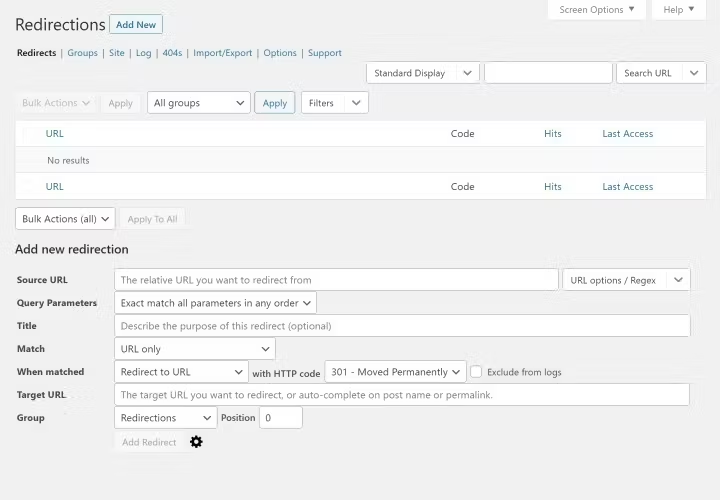
Best for: Sites that frequently change URLs, restructure content, or migrate pages
Every time you change a URL, delete a page, or restructure your site, you risk losing the link equity and rankings that page had earned. Redirection solves this problem by letting you set up 301 redirects directly from your WordPress dashboard — no server configuration required.
Broken links and 404 errors are both bad for user experience and SEO. Search engines treat 404 errors as signals that your site is poorly maintained. Redirection monitors your site for these errors and helps you fix them quickly.
Key Features of Redirection
- Simple 301 redirect creation for any URL on your site
- Automatic redirect creation when you change a post or page URL in WordPress
- 404 error monitoring with a full log of broken URLs being accessed
- Bulk redirect import and export via CSV files
- Conditional redirects based on login status, referrer, or browser type
- Regular expression support for advanced redirect rules
Verdict
Redirection is a must-have plugin for any site that manages URLs actively. If you ever rename a post, restructure categories, or migrate to a new URL structure, Redirection protects your rankings and prevents link equity loss.
8. Jetpack Boost — Best for Core Web Vitals Improvement
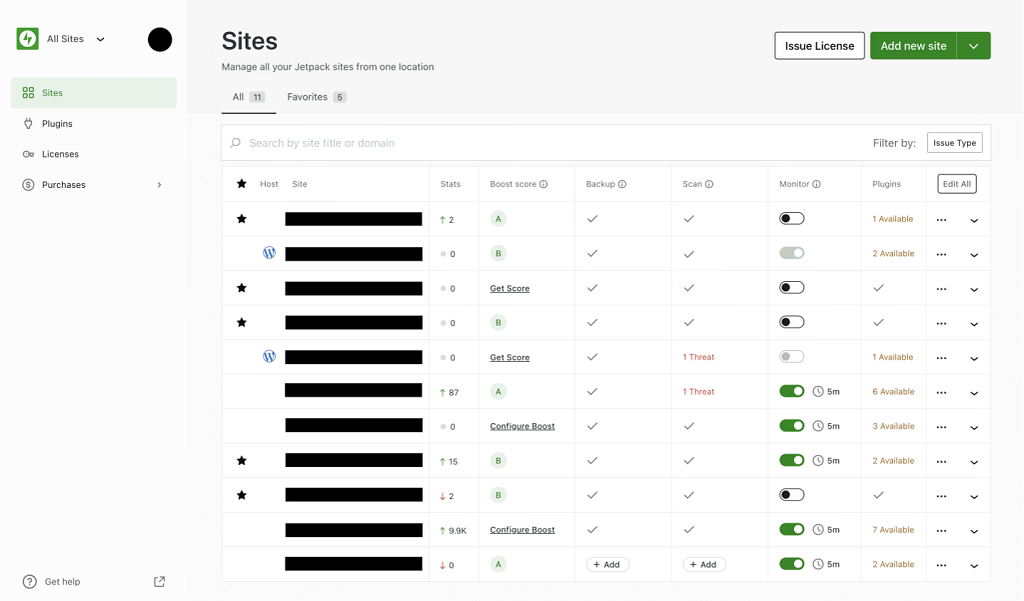
Best for: Sites that need quick, impactful performance improvements with minimal configuration
Core Web Vitals are Google’s official page experience signals. They measure loading performance, interactivity, and visual stability. Sites that perform well on Core Web Vitals have a measurable ranking advantage over slower competitors. Jetpack Boost is designed specifically to improve these scores without requiring developer expertise.
Key Features of Jetpack Boost
- Critical CSS generation that eliminates render-blocking stylesheets above the fold
- Deferred JavaScript loading to prevent scripts from slowing initial page render
- Lazy image loading for all images across your site automatically
- Page speed score dashboard showing your Core Web Vitals performance
- Cloud-based CSS generation that doesn’t add server load
- Simple toggle-based interface requiring no technical configuration
Verdict
Jetpack Boost delivers meaningful Core Web Vitals improvements with minimal setup effort. For sites with poor PageSpeed scores but without developer resources, it provides quick wins that directly support SEO performance.
9. Schema & Structured Data for WP & AMP — Best for Rich Snippets
Best for: Sites that want to maximize rich snippet appearances in search results
Structured data tells search engines exactly what your content is — an article, a product, a recipe, a review, a FAQ. When search engines understand your content type precisely, they can display rich results: star ratings, price ranges, cooking times, and FAQ dropdowns directly in the search results. Rich snippets dramatically improve click-through rates.
Key Features of Schema & Structured Data
- Support for multiple schema types including Article, Product, Review, Recipe, and Event
- FAQ schema blocks that display expandable questions directly in search results
- Product schema with price, availability, and rating markup for eCommerce pages
- Gutenberg blocks for adding structured data without coding
- AMP compatibility for accelerated mobile pages
- Schema validation tool to check your markup is error-free
Verdict
Schema & Structured Data is the best dedicated schema plugin for WordPress. If your primary SEO plugin’s schema features feel limited, this plugin provides deeper control and more schema types for maximizing rich snippet opportunities.
10. Better Robots.txt — Best for Advanced Crawl Control
Best for: Advanced users who need precise control over how search engines and AI bots access their site
The robots.txt file tells search engines which pages they can and cannot crawl. Getting this wrong can accidentally block your most important pages from being indexed — or waste crawl budget on pages that don’t matter. Better Robots.txt gives you a clean interface for managing this critical file.
In 2026, this plugin has become especially relevant for managing AI bot access. As large language models and AI scrapers crawl the web, more site owners want control over which AI systems can access their content.
Key Features of Better Robots.txt
- Visual editor for creating and modifying your robots.txt file without coding
- Predefined rules for common crawlers including Googlebot and Bingbot
- AI bot management to allow or block specific AI crawlers like GPTBot and CCBot
- SEO-safe configuration templates that prevent accidental indexing blocks
- Sitemap URL declaration to help search engines find your sitemap
- Crawl delay settings for managing server load from aggressive bots
Verdict
Better Robots.txt is essential for sites where crawl budget matters and for anyone who wants control over AI bot access. Most small sites won’t need it immediately, but growing sites with hundreds of pages benefit significantly from proper crawl management.
How to Choose the Right WordPress SEO Plugin for Your Site
With so many strong options available, choosing comes down to your specific situation and needs.
Beginners and content creators should start with Yoast SEO Premium for its guided approach, or Rank Math for its powerful free features. Both are excellent starting points that handle the essentials without overwhelming complexity.
Growing sites and businesses should consider All in One SEO for its advanced features and AI search readiness, or stick with Rank Math if the free tier continues to meet their needs.
Developers and performance-focused sites should look at The SEO Framework for its lightweight approach and clean automation.
No matter which primary SEO plugin you choose, consider adding Smush for image optimization, Redirection for URL management, and Google Site Kit for performance monitoring. These tools work alongside your primary plugin rather than competing with it.
Common SEO Plugin Mistakes to Avoid
Even with the best plugin, common mistakes can undermine your results. Here are the most important ones to avoid:
- Using multiple SEO plugins simultaneously: Running Yoast and Rank Math at the same time causes conflicts and duplicate meta tags. Choose one primary SEO plugin and stick with it.
- Ignoring page speed: Your SEO plugin cannot compensate for a slow theme or unoptimized images. Address performance issues separately with tools like Smush and Jetpack Boost.
- Not connecting Google Search Console: Search Console data is essential for understanding your actual rankings, identifying indexing problems, and spotting opportunities. Connect it immediately after setup.
- Over-optimizing for plugin scores: An SEO score of 100 does not guarantee rankings. Focus on creating genuinely helpful content rather than chasing a perfect plugin score.
- Ignoring schema markup: Structured data is one of the most underused SEO tools. Rich snippets improve click-through rates significantly and give your content a visual advantage in search results.
Conclusion
A WordPress SEO plugin won’t magically rank your site overnight. But it removes the technical barriers that prevent good content from performing well. The right plugin ensures your pages are properly structured, your metadata is optimized, your sitemaps are current, and your technical SEO is handled correctly.
Combine the right plugin stack with high-quality content, a solid link-building strategy, and consistent publishing to grow your organic traffic sustainably. The tools in this guide give you everything you need to compete — and win — in organic search in 2026.